
Vital Signs Monitors for Clinics and Medical Practices
10/28/2026 05:18:17
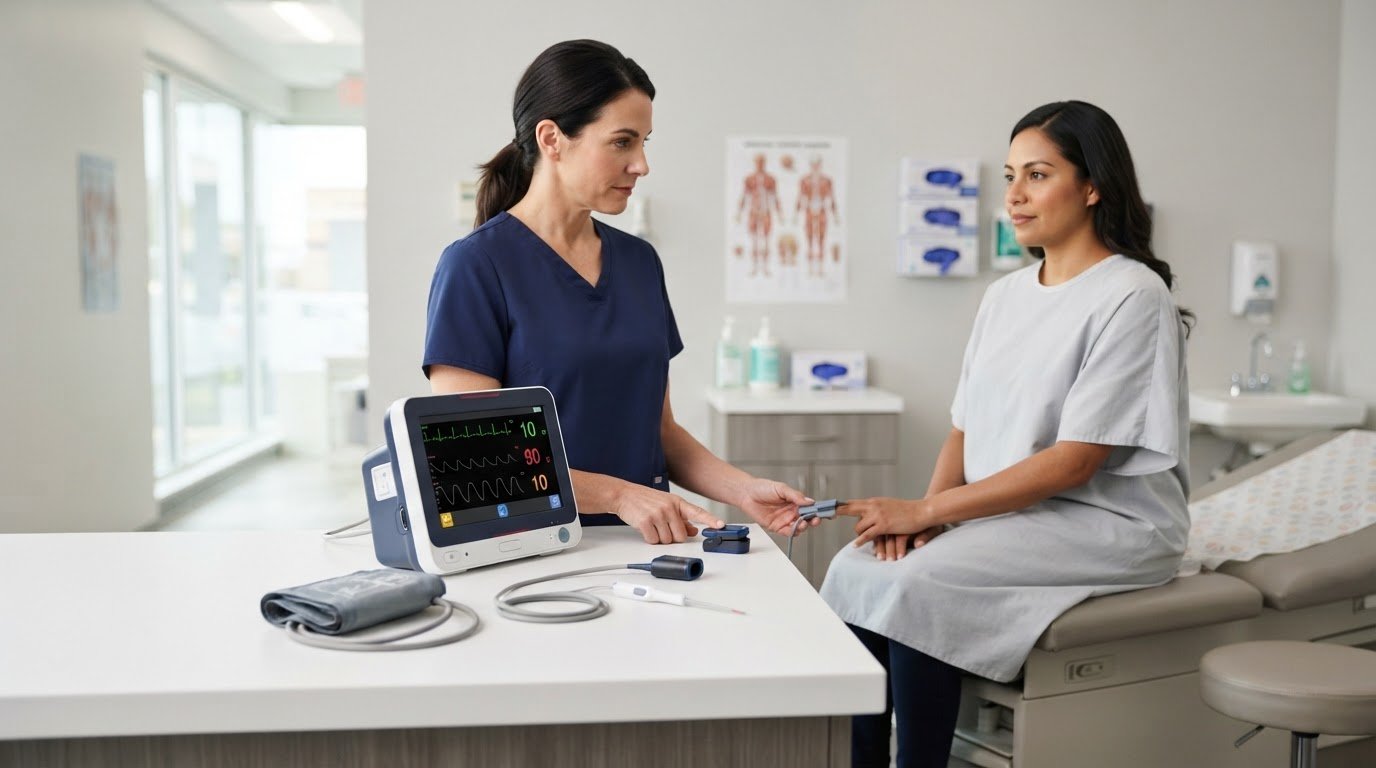
The right monitor is the one that captures the measurements your routine exams require. Vital signs monitors for sale may combine blood pressure, SpO2, and temperature readings, but available functions vary by device. Compare overstock, demo, and refurbished options by their condition, included measurements, and fit for your clinic’s workflow.
When comparing vital signs monitors for sale, consider the device’s functions and condition together. A lower-cost option is useful only if its stated capabilities fit your exam workflow. This guide explains what to review when choosing equipment for routine patient checks.
You’ll learn how to match measurement needs to your workflow and compare the details provided in product listings. The aim is to choose equipment suited to your practice, rather than focus on features you don’t need.
Key Takeaways
- Match the monitor’s measurements to routine exam needs, including blood pressure, SpO2, and temperature, rather than choosing by appearance alone.
- Compare overstock, demo, and refurbished equipment by condition and included components to understand what each option means for your clinic.
- Build a consistent measurement process and account for how device setup and use can affect reading accuracy.
- Consider the supplies, warranty coverage, and ongoing maintenance involved alongside the monitor itself.
- Explore blood pressure devices from USA Medical and Surgical Supplies when you’re selecting equipment for routine clinical measurements.
Blood pressure, SpO2, and temperature monitoring
A multi-parameter monitor brings several routine measurements into one workflow. The core combination in this section is blood pressure, peripheral oxygen saturation (SpO2), and temperature. Before comparing devices, identify which of these readings your exams require, who will use the monitor, and where measurements take place. A device that supports the right measurements can reduce the need to move between separate instruments during a visit.
Blood pressure monitoring requires a cuff that fits the patient and a clear process for obtaining and recording the result. Consider the range of patients seen in your practice, including whether staff need cuffs in different sizes. SpO2 monitoring adds an oxygen-saturation reading, while temperature measurement provides a separate vital sign. These readings answer different clinical questions, so one measurement should not be treated as a substitute for another.
Check the device’s stated measurement functions before comparing overstock, demo, and refurbished listings. When shopping for vital signs monitors for sale through providers like USA Medical and Surgical Supplies, remember that condition labels describe the item’s sale status and do not tell you which measurements the monitor can take. Review the product details for blood pressure, SpO2, and temperature separately. For example, if routine exams require all three, confirm that each function is included in the selected configuration rather than assuming every monitor has the same setup.
- Blood pressure: Identify the cuff options needed for the patients your clinic sees, and consider how staff will select and use the appropriate cuff.
- SpO2: Confirm that oxygen-saturation measurement is part of the device’s stated configuration and fits the exam workflow.
- Temperature: Check that temperature measurement is included, then account for how staff will obtain and record that reading.
- Combined use: Compare the three functions against your exam routine, not just the monitor’s general category or display.
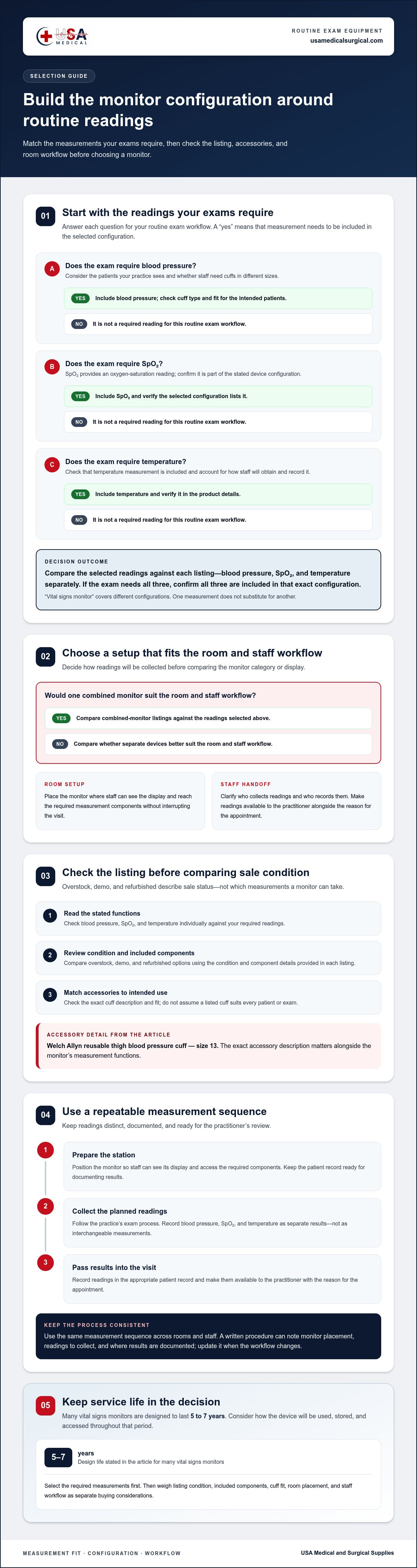
Use a short selection process. First, list the readings your routine exams require. Next, decide whether one combined monitor or separate devices better suits the room and staff workflow. Then compare each listing’s stated functions and condition. The term “vital signs monitor” covers different configurations, so focus on the measurements your practice actually takes.
Many vital signs monitors are designed to last 5 to 7 years. That makes fit-for-purpose selection relevant beyond the initial purchase. Consider how the device will be used throughout that period, including where it will be stored and how staff will access its readings. Match the monitor’s measurement functions to exam needs first, then weigh condition and workflow as separate buying considerations.
Ensure the equipment remains reliable and properly outfitted throughout its service life. A Welch Allyn reusable thigh blood pressure cuff is size 13. That detail illustrates why checking the exact accessory description matters alongside the monitor’s measurement functions. Verify that the cuff type and fit suit the intended patient and workflow, rather than assuming a listed cuff serves every exam.
Monitoring during routine medical exams
A vital signs monitor supports routine exams by bringing measurement information into the visit workflow. Practitioners can use vital signs data to track, diagnose, and treat patients. The monitor is one part of that process: staff collect readings, record them in the appropriate patient record, and share them with the practitioner. For example, an exam may include a blood pressure reading, an SpO2 reading, and a temperature measurement before the practitioner reviews the patient’s concerns.
Arrange the exam room so staff can reach the device and accessories without interrupting the visit. Follow a consistent measurement sequence for each patient. A clear workflow helps staff avoid missing a reading or leaving it out of the record.
- Prepare the station. Place the monitor where staff can see its display and access the required measurement components. Keep the patient record ready for documenting results.
- Collect the planned readings. Follow the practice’s exam process for taking each measurement. Record blood pressure, SpO2, and temperature as separate results rather than treating them as interchangeable.
- Pass results into the visit. Make the readings available to the practitioner alongside the reason for the appointment. The practitioner can then use them with other patient information.
Consistency matters across rooms and staff. If exam rooms use different measurement sequences, results may be delayed or omitted from visit records. A written procedure can state where the monitor is placed, which readings are collected, and where staff document them. Keep the same checklist at each station and update it when the exam workflow changes.
Consider patient flow as well as measurement functions. In a busy clinic, staff may move equipment between rooms or keep it near a particular exam area. Position the monitor so it supports the visit sequence without blocking access to the patient or other equipment. A brief staff orientation can clarify who collects readings and who enters them in the record.
Choose a configuration that fits the exam routine, then align room setup and documentation around it. Practices comparing vital signs monitors can use the product category as a starting point, while matching device functions to their established workflow. The practical goal is a repeatable handoff: staff gather the readings, record them clearly, and make them available for clinical review.
Are vital signs monitors FDA-cleared, and what regulations apply in the United States?
A product category alone does not establish whether a specific vital signs monitor is FDA-cleared. Marketing descriptions may use the phrase “FDA-approved,” but that does not establish the regulatory status of every model. Treat regulatory wording as specific to the model, and distinguish general product descriptions from documentation for the exact device.
Start with the manufacturer, model name, and configuration. For example, a Carescape V100 listing identifies a particular monitor, but its name alone doesn’t answer the status question. Match any regulatory statement to the exact model and included measurement functions. A statement about one configuration shouldn’t automatically be applied to another device or a modified setup.
Also look at the device’s stated intended use. A monitor designed to measure blood pressure, SpO2, and temperature may have a different configuration from a patient monitor intended for broader monitoring. The product description, labeling, and supporting documentation should tell a consistent story about the device’s purpose and functions. If a listing uses “FDA-cleared” or “FDA-approved,” preserve that exact wording rather than swapping one term for the other.
For a United States purchasing review, organize the available evidence before comparing a monitor’s condition or features. Use this sequence:
- Record the identity. Note the manufacturer, exact model, and configuration shown for the device.
- Read the intended-use statement. Compare it with the measurements and routine exam tasks your practice requires.
- Match the regulatory claim. Keep the wording tied to the same model and documentation, not just a product family or category.
- Review condition separately. Overstock, demo, and refurbished describe sale condition; they don’t establish regulatory status.
This distinction helps prevent a common purchasing mistake: treating a condition label as evidence of regulatory status. A demo unit and a refurbished unit may have different histories, but those descriptions alone do not establish the regulatory status of a specific monitor. A feature list does not replace clear model identification.
For each option among vital signs monitors for sale, record the model, intended use, measurement functions, and exact regulatory wording. This gives procurement staff a consistent basis for comparing listings without assuming all monitors have the same status. It also helps identify descriptions that are too general to support a model-specific conclusion. Use the device’s documentation as the reference point, and don’t treat broad marketing language as a regulatory claim.
What are the risks of inaccurate readings and how should monitors be calibrated?
An inaccurate reading can give the care team an unreliable picture of a patient’s condition. For example, an incorrect blood pressure value may affect how the practitioner interprets the visit. A misleading SpO2 or temperature result can also distract from the information gathered through other parts of the exam. Treat unexpected readings as a reason to review the measurement, not as a standalone conclusion.
Several practical factors can affect measurements. Staff may use an incorrect cuff size, position a sensor poorly, or select the wrong setting. A damaged accessory or monitor fault can also produce unreliable results. If a reading seems inconsistent with the patient or other observations, repeat it according to the device’s instructions and the practice’s established workflow. Record the repeat result and relevant context.
Calibration helps ensure a monitor measures as intended. Some patient monitor listings state that devices are tested and calibrated. For a device in service, follow the manufacturer’s instructions for calibration and maintenance. Don’t assume that powering on the monitor or seeing a display means its measurement functions have been checked. Keep the instructions with the equipment so staff can follow the process for that model.
Use a simple quality routine for each device:
- Identify the monitor. Record its manufacturer and model so staff can use the correct operating instructions.
- Review the instructions. Follow the manufacturer’s stated calibration process for the specific monitor and measurement functions.
- Document the work. Record completed checks, calibration activity, and any issue that could affect use.
- Escalate faults through the practice’s process. If the monitor displays an error or readings remain inconsistent, take it out of routine use until the issue is addressed.
Keep calibration records with the device’s maintenance history. Each dated entry should identify the monitor, the work performed, and who completed it. This distinguishes a calibration check from routine cleaning or visual inspection and provides a clear record when equipment moves between exam rooms or users.
Include the process in staff training. Show each new user where to find the model-specific instructions and how to report an inconsistent result. Accuracy depends on both the monitor’s condition and correct use. Consistent documentation, suitable accessories, and the manufacturer’s calibration instructions help reduce avoidable measurement errors during routine exams.
Equipment selection can support a reliable measurement process from the outset. Buyers should first determine what data they want to collect and why; only then should they consider useful features and brands. Keeping those choices tied to the intended data helps make the selection deliberate rather than driven by features alone. The purpose of collection should guide which capabilities are relevant, while comparison of brands and features follows that decision. This sequence gives the practice a clear basis for choosing equipment and complements the attention to correct use, checks, and records described above.
What supplies, warranties, and maintenance costs come with vital signs monitors?
A monitor’s condition does not tell you which accessories are included. Review each listing and configuration for the items needed in your exam workflow. For example, a blood pressure setup may require a compatible cuff, while other measurement functions may need different accessories. Distinguish items included with the device from those that must be sourced separately.
Use the monitor’s model details to assess accessory compatibility. Components that look similar may not fit or work with every device. Record the model and configuration, then compare the listed accessories with your routine measurements. This is particularly useful when comparing overstock, demo, and refurbished units, which may include different components.
Review warranty terms carefully. Refurbished patient monitors may be sold with coverage, but the phrase “warranty-backed” does not explain what it includes. Read the terms for the covered device or components, coverage period, and process for handling a covered issue. Keep those details with the purchase record instead of relying on a general description.
Build a practical ownership checklist before selecting a unit:
- Included supplies: List each accessory in the configuration and identify any components needed for planned measurements.
- Compatibility: Match components to the monitor’s manufacturer and model before adding them to the equipment setup.
- Warranty scope: Record what the coverage applies to, how long it lasts, and how a claim is handled.
- Routine care: Follow the manufacturer’s instructions for cleaning, storage, inspection, and maintenance.
- Replacement planning: Identify which accessories may need replacement and how staff will track their condition.
Maintenance needs depend on the device configuration, accessories, and care practices. A monitor requiring additional components creates different ongoing purchasing needs from a setup that includes the required accessories. Follow the manufacturer’s instructions and account for how the clinic uses the device. Keep routine care distinct from repairs or calibration, since each involves different tasks.
Maintain a device record with the model, included accessories, warranty terms, and completed care. Staff can note when an accessory is inspected or replaced and keep the relevant instructions nearby. This provides a practical reference when equipment moves between exam rooms or users.
Before choosing among vital signs monitors for sale, compare the full ownership picture, not just the monitor. Review included supplies, warranty coverage, and the manufacturer’s care instructions together. Partnering with established distributors, such as Novus Medical for specialized medical devices and equipment support, can also help practices secure reliable products and ongoing service. This helps your practice plan for daily use and upkeep without assuming every listing includes the same components or support.
USA Medical and Surgical Supplies: Blood Pressure Devices
USA Medical and Surgical Supplies offers Blood Pressure Devices for clinics selecting equipment for routine measurements. Browse this category if your practice needs blood pressure equipment as part of its monitoring workflow. Compare the device type with your exam process, staff use, and patient needs. For related diagnostic equipment, the catalog also includes Dopplers, ECG Machines, and ECG Electrodes.
Use this guide to define your measurement needs, review monitor condition, and plan for accessories and maintenance. Then browse the relevant equipment category to support your purchasing decision.
Visit USA Medical and Surgical Supplies to explore Blood Pressure Devices.
Make your next equipment decision with confidence
Set a clear purchasing goal before comparing models: choose equipment that fits your clinic’s routine and workflow. When comparing vital signs monitors for sale, consider how each device fits the room setup, staff procedures, and future equipment plans. A defined purpose keeps the decision focused on practical use.
USA Medical and Surgical Supplies offers Blood Pressure Devices, Dopplers, and ECG Machines for clinical equipment needs. These categories can help practices consider related diagnostic equipment as part of their monitoring plans.
Use your requirements to guide the next step, whether you’re selecting a monitor or planning a broader equipment purchase. Contact USA Medical and Surgical Supplies to explore equipment for your practice.
A thoughtful selection process makes purchasing more straightforward and keeps your clinic’s needs at the center.
Frequently Asked Questions
What vital signs and measurements can different monitors track?
Monitor measurements depend on the device’s configuration. A routine-exam model may measure blood pressure, SpO2, and temperature, while another setup may collect a different combination. Compare the exact functions shown for each model rather than relying on a broad category name. For example, create a checklist with one column for each measurement your clinic needs, then compare product details against that list before selecting a device.
Where can I buy new or refurbished vital signs monitors in the United States?
USA Medical and Surgical Supplies sells Vital Signs Monitors through its online catalog for customers in the United States. Browse the category and review individual product listings to understand the available equipment and its condition. The catalog also includes Blood Pressure Devices, Dopplers, and ECG Machines. Match the listing details to your practice’s measurement needs and purchasing requirements before choosing a monitor.
How much do vital signs monitors cost in the United States?
Which vital signs monitors are best for hospitals and clinics?
For clinics, choose a monitor that includes the readings routine exams require, such as blood pressure, SpO2, and temperature. Confirm the configuration and condition, and make sure its setup fits staff workflow and patient flow.
How do leading vital signs monitor brands and models compare?
Compare each model’s stated measurements and configuration with your exam needs.