
Diagnostic radiology monitor options for clinical departments
11/09/2026 05:19:31

The brand name matters less than whether the monitor fits the imaging task. A diagnostic radiology monitor for sale may be a refurbished or demo unit, and the right choice also depends on screen format and clinical use. Medical color monitor options range from 2 MP through 12 MP, with single-head and dual-head configurations.
Choosing a display involves more than comparing resolution. A monitor for radiology review may serve a different role from a surgical or general clinical display, so start with the intended use. Then narrow the options by format, specifications, and model.
This guide explains how refurbished and demo monitors differ, what screen formats and resolutions can mean for radiology settings, and how brands fit into the comparison. It also covers clinical uses, including PACS review and breast imaging, so you can assess which factors matter for your department’s workflow.
Key Takeaways
- Match screen format and resolution to the department’s imaging tasks rather than choosing by size alone.
- Compare refurbished and demo options by condition and intended use to narrow the right fit.
- Consider whether single-head or dual-head displays better support your PACS and clinical review workflow.
- Use clinical needs to guide brand comparisons, including the display’s role in radiology or breast imaging.
- Keep image-display specifications and US regulatory questions as separate parts of the selection process.
Monitor sizes and screen formats
Choose a screen based on the images and workflow it must support, not physical size alone. Resolution and aspect ratio also affect how medical images appear on screen.
Monitor Size Options
Physical screen size describes the viewing area, while megapixels describe image resolution. They are different specifications: a larger screen does not automatically show more image detail. Compare both when evaluating a diagnostic radiology monitor for sale.
Start with the department’s viewing tasks. Consider whether staff review one image at a time, compare images side by side, or need space for image controls beside a study. These questions help identify the screen area the workflow calls for without treating a larger display as a substitute for appropriate resolution.
Consider the workstation layout, too. The display should fit the available desk space and allow a practical viewing position. A mammography workstation and a general radiology review station may have different layout needs, so assess the room and intended use before choosing a screen size.
Screen Format Choices
Aspect ratio describes the relationship between a screen’s width and height. The EIZO PX3150 has a 17:9 aspect ratio. That format gives departments a specific screen shape to consider when planning how images and viewing controls will fit together.
Resolution and color mode matter alongside shape. The store lists 1-megapixel color and grayscale displays for surgery and radiology modalities. This is a concrete example of why the intended modality should guide the comparison: grayscale viewing and color display are distinct options, not interchangeable labels.
For each candidate, record the physical size, aspect ratio, resolution, and color mode. Compare these details with the department’s imaging tasks and workstation layout. This keeps the selection focused on actual use rather than a single headline specification.
PACS, breast imaging, and clinical review monitors
PACS workstations bring imaging into a digital review workflow, but departments use displays for different clinical tasks. A monitor selected for clinical review should suit the images being viewed and the way staff compare studies. Medical color displays are available from 2 MP through 12 MP, in single-head and dual-head configurations. That range gives departments a practical starting point for matching display resolution and setup to intended use.
Match the Display to the Review Task
For PACS review, consider how staff arrange images, tools, and prior studies on screen. A single-head display has one screen; a dual-head setup has two. The useful configuration depends on the workflow, including whether readers need to view a current study and comparison images together.
Resolution is another selection point. The available medical color options include 2 MP, 3 MP, 4 MP, 5 MP, 6 MP, 8 MP, 10 MP, and 12 MP. These are distinct display choices, not a ranking that automatically determines suitability. Identify the clinical task first, then compare the resolution and screen arrangement against that task.
Breast Imaging and Diagnostic Review
For breast imaging, base the display decision on the department’s specific review workflow. Resolution options are worth comparing, but the resolution label alone does not establish whether a monitor suits a particular task. Consider intended use, image presentation needs, and workstation setup together, rather than assuming one resolution suits every breast imaging station.
Displays can serve different purposes within one department. A PACS reading station may support image interpretation, while another screen may be used for clinical review or reference. These roles can call for different arrangements. For example, a department that regularly places related images side by side may consider a dual-head configuration, while a single-screen workflow may favor a single-head display.
A practical shortlist starts with the task, then narrows by resolution and head configuration. Record whether the display will support PACS reading, breast imaging, or general clinical review. Next, compare the available 2 MP through 12 MP options and single-head or dual-head formats against that use. This approach makes the reason for each choice clear and helps separate workflow requirements from headline specifications.
Keep the distinction between intended use and resolution in view. A 12 MP option is one available specification, not a universal answer for every imaging workflow. Likewise, choosing a dual-head display should reflect how clinical staff use two screens. Connecting those decisions to actual PACS and review tasks keeps monitor selection specific to the department.
Radiology monitor brands
Brand comparisons are most useful when they focus on a named model and its intended imaging role. EIZO PX3150 provides a concrete starting point for comparing screen format and product details. The 17:9 aspect ratio identifies its shape, but the brand name alone doesn’t establish whether it suits a department’s medical diagnostic workflow. Compare each candidate against the clinical task and workstation setup.
Use model names carefully. EIZO and RadiForce may appear in radiology monitor searches, but a brand or product-family name is not a substitute for evaluating the specific model. Record each option’s model, resolution, screen format, and intended use. Compare like with like, such as displays considered for the same imaging station, rather than treating every product from one brand as equivalent.
Calibration is another useful comparison point. Establish what calibration-related information comes with the specific monitor and how it fits the department’s display workflow. Avoid assuming that a brand name alone tells you how a unit is calibrated or maintained. For example, compare the documentation and calibration details attached to an EIZO PX3150 listing with those provided for another candidate.
Warranty and service options deserve direct review before purchase. The listed 3-megapixel monitors carry five-year warranties. For any candidate, compare the stated warranty coverage, exclusions, and process for service or support; these details can differ by model and purchase condition.
Condition is another factor when comparing refurbished and demo units. A familiar manufacturer name does not describe an individual unit’s history or condition. Assess the model specifications separately from the unit’s sale condition, and review the documentation and warranty terms for that specific option. Brand reputation alone cannot tell you about the actual monitor.
- Identify the exact model: distinguish EIZO PX3150 from general brand references.
- Compare intended use: match the model to the imaging workflow and workstation.
- Review calibration details: consider the information provided for the individual display.
- Assess coverage and service: read the applicable warranty terms, including exclusions and support process.
- Separate brand from condition: evaluate refurbished and demo units on their specific details.
For example, a department comparing an EIZO PX3150 with another screen can first note the EIZO model’s 17:9 format, then review each candidate’s resolution, calibration information, condition, and warranty. This approach turns brand research into a repeatable comparison instead of a preference based only on manufacturer recognition. Keep the shortlist tied to the same clinical purpose, and treat each specification as a model-specific detail.
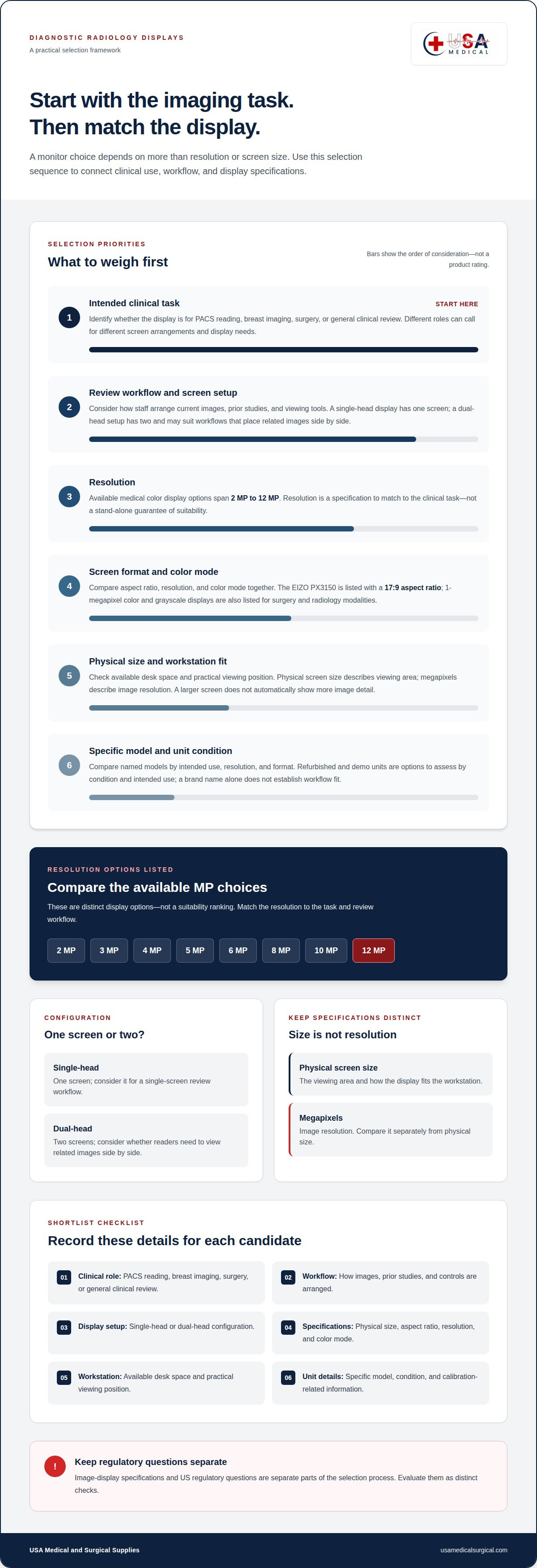
What specifications should a diagnostic radiology monitor meet for medical imaging?
No single resolution or screen format defines every diagnostic monitor. Start with the imaging task, then compare each candidate’s stated specifications with that use. A PACS review station, breast imaging workflow, and surgical display may have different requirements, so let the intended image type guide your review.
Use this sequence to organize the comparison:
- Name the task: record whether the monitor is for PACS reading, breast imaging, grayscale review, or another clinical use.
- Review resolution: compare the listed megapixel value with the use case. Available medical color options span 2 MP through 12 MP, so evaluate the specific model rather than relying on a general label.
- Check image mode: distinguish color from grayscale. The listed 1-megapixel color and grayscale displays illustrate why the display mode should match the intended modality.
- Assess screen arrangement: decide whether one screen or a dual-head setup fits the workflow. Consider how readers place images and controls during review.
- Record model details: capture the exact model and its stated specifications for a direct comparison.
Resolution is one part of the specification, not a complete measure of fit. For example, a 2 MP display and a 12 MP display represent different listed resolution options, but the number alone doesn’t establish suitability for a particular clinical task. Whether evaluating displays for hospital PACS or specialized imaging setups such as viewing scans from a FIDEX+ veterinary CT, pairing the resolution with the intended use, display mode, and workstation arrangement keeps the decision tied to the actual imaging workflow.
Screen format also belongs in the comparison. The EIZO PX3150 has a 17:9 aspect ratio, which provides a concrete model-specific format to assess. Compare the shape of each candidate’s screen with the planned image layout. Don’t treat aspect ratio as a substitute for resolution or intended use.
Consider calibration information at the model level. Record the details provided for each candidate alongside its resolution, image mode, and format. A brand or product-family name does not, by itself, describe those details. Comparing information for specific models makes differences easier to identify.
Separate technical fit from purchase condition. A refurbished or demo unit still needs to be assessed against the same clinical task and specification criteria. For example, compare its model details and stated image mode with the requirements for a PACS station. A structured review helps distinguish a specification match from a familiar name or screen size.
Complete the comparison by considering whether the display supports the workflow in which it will be used, and keep the decision tied to the clinical task rather than to a product label alone. In 2024, Wrightington Hospital in Lancashire, UK, was featured in a case study about radiology workflows using high-quality imaging. That example offers a reason to examine the workflow alongside the monitor: note how images are reviewed, what information needs to remain visible, and whether the chosen arrangement fits the work. Treat the case study as context, not as a substitute for checking each candidate’s stated specifications against the intended use.
Do diagnostic radiology monitors need FDA clearance or other US certifications?
FDA clearance or another US certification cannot be determined from the phrase “diagnostic radiology monitor” alone. The specific model, intended use, and product claims determine which regulatory documentation is relevant. Do not infer a model’s status from terms such as “medical,” “diagnostic,” or “radiology” in its description.
Keep regulatory status separate from technical specifications. Resolution, grayscale or color display, and screen format describe display characteristics. They don’t establish whether a product has a particular clearance or certification. For example, an EIZO PX3150’s 17:9 aspect ratio identifies its format, not its regulatory status.
Review the documentation for the specific model rather than relying on a brand name or category label:
- Identify the exact model: match its full product name to its documentation.
- Review intended use: note how the manufacturer describes the display and its role.
- Read the regulatory statements: distinguish product claims from technical specifications.
- Record supporting documents: keep the model’s relevant regulatory information with procurement records.
This process helps determine whether documentation for a particular monitor supports its intended use. A general statement about radiology monitors cannot establish the status of every model. If documentation describes a monitor as suitable for medical imaging, consider that statement alongside model-specific regulatory information, not in its place.
Purchase condition also matters when reviewing paperwork. A refurbished or demo unit may be the same model as a new unit, but its listing should identify the model and condition clearly. Match regulatory documents to that model. A familiar manufacturer name, warranty, or stated resolution does not prove clearance or certification.
For procurement teams, keep the decision trail concise. Record the monitor model, intended clinical use, available regulatory statements, and technical specifications separately. If the monitor will be used within a larger imaging system, note which item each statement concerns. This helps prevent claims about one component from being mistaken for documentation about another.
FDA clearance and certification questions are product-specific, so evaluate the monitor’s own documentation rather than relying on broad category wording. Browse diagnostic radiology monitor options as you compare models and their stated details.
USA Medical and Surgical Supplies: Diagnostic Radiology Monitors
USA Medical and Surgical Supplies offers diagnostic radiology monitors for departments sourcing medical imaging displays. Use the criteria in this guide to define your requirements, including intended use, resolution, screen format, and configuration. These priorities can help you build a practical shortlist before choosing a monitor.
The broader Diagnostic Equipment range also includes blood pressure devices, Dopplers, and ECG machines. For a department sourcing a radiology display, start with the monitor category and the specifications that fit its workflow.
For help with your diagnostic radiology monitor needs, contact USA Medical and Surgical Supplies.
Plan Your Department’s Next Display Decision
Set the next step around your department’s workflow. Before moving a diagnostic radiology monitor for sale into procurement, write a brief describing the use case. Note who will use the display, which imaging tasks it supports, and how it fits the workstation. This gives clinical and procurement staff a shared basis for weighing options and trade-offs.
Use the brief to keep the purchase discussion focused. A clear description of the display’s intended role helps your team align priorities, organize requirements, and assess how an option fits the department. Ground the decision in practical workflow needs rather than broad preferences.
When you’re ready to discuss your department’s requirements, contact USA Medical and Surgical Supplies. A clear starting point can make the next equipment decision more manageable.
Frequently Asked Questions
Where can I buy a refurbished diagnostic radiology monitor in the US?
USA Medical and Surgical Supplies sells diagnostic radiology monitors in the United States. For a refurbished purchase, use the condition label to distinguish the item from a demo or new unit. Compare its exact model and specifications with your department’s needs, and review the unit-specific warranty terms. The company also offers other diagnostic equipment, including blood pressure devices, Dopplers, and ECG machines.
How do 2MP, 3MP, 5MP, and 8MP radiology monitors compare?
These labels indicate different image resolutions, measured in megapixels: 2 MP, 3 MP, 5 MP, and 8 MP. They don’t by themselves establish which monitor fits a particular workstation or imaging task. For example, compare the 5 MP and 8 MP options by considering the intended clinical use and the display’s other specifications. Choose based on the department’s workflow, not the megapixel label alone.
What is the difference between a diagnostic and clinical review monitor?
A diagnostic monitor is intended for diagnostic image interpretation, while a clinical review monitor supports broader image viewing in clinical work. The labels alone do not specify a model’s resolution, display mode, or suitability for a particular task. For example, a team viewing images alongside other clinical information should compare the monitor’s stated specifications and intended use with that workflow. Exact model details are more useful than the category name alone.
What are the best diagnostic radiology monitors for sale in the US?
There is no single best monitor for every department. Compare the intended imaging task, resolution, screen format, and single-head or dual-head setup; medical color options range from 2 MP through 12 MP.